How do you make a staff schedule for a martial arts studio?
By Al Davies · Updated November 3, 2026
Short answer: Start with the class timetable, then add one line under each class for the instructor and one for the front desk. Fill the fixed classes first and leave seminar, belt test and tournament days for last.
What are the steps?
- Copy the weekly class timetable: day, time, program, mat.
- Write the instructor and the backup instructor for each class.
- Add front desk coverage for the hours the doors are open.
- Collect time off and travel dates before you assign anyone.
- Mark the seminar, belt test or tournament days and staff them separately.
- Pin the final week where every coach can find it, and share the link.
Why separate the class timetable from the staff schedule?
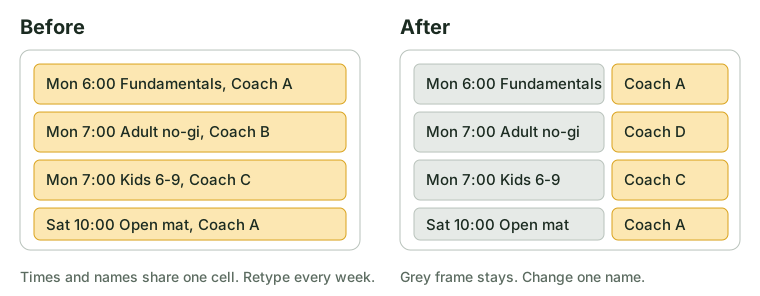
The class timetable changes a few times a year. The staff schedule changes every week. A studio that mixes them has to retype the whole timetable each time one coach is away.
Keep the timetable as the fixed frame: age group or belt level, day, time and mat. Put people into it each week. When the frame never moves, a missing coach is one name to change, not a new document.
What should one week look like?
Mon 6:00 PM Fundamentals (mat 1): Coach A, backup Coach B
Mon 7:00 PM Adult no-gi (mat 1): Coach B
Mon 7:00 PM Kids 6-9 (mat 2): Coach C
Mon 5:30-9:00 PM Front desk: Sam
Sat 10:00 AM Open mat: Coach A
Write one line per class. A coach can scan the week and spot their own name in seconds.
Front desk or instructor: who covers what?
| Role | What it covers | Plan for it |
|---|---|---|
| Lead instructor | Teaches the class | Name one backup per class |
| Assistant | Helps with kids or large classes | List only for the classes that need one |
| Front desk | Check-in, questions, trial visitors | Cover every open hour, even on slow days |
A class with no one at the desk still runs, but visitors and parents have no one to ask. List the desk on its own line so it does not get forgotten.
How do you handle seminars, belt tests and tournaments?
Treat each one as its own small schedule. Write the date, the start and end time, and the number of people you need: mat helpers, a check-in person, a person to run the clock.
Staff them after the regular week is set. That way you see who is still free instead of guessing.
In ShiftGarden, add the seminar as an event with its headcount and start time. It shows as short until enough people are on it.
Tip: Post event staffing at least a week before, so coaches can plan their own training.
Where should the schedule live?
Put it in one place that never moves. A single page with one link beats scrolling a group chat to find Thursday.
ShiftGarden puts the week on one page by role and prints it for the wall with a QR code. Instructors and front desk scan it to see their own shifts, with no app to install. See how ShiftGarden shows the week.
FAQ
How many backup instructors do you need?
Name one backup for every class that has a single instructor. Then a sick day is one phone call.
Should kids and adult classes share one schedule?
Yes. Keep one schedule with a line per class and mat, so overlapping classes show who is where.
Can I print the schedule?
Yes. A printed page on the wall helps people who do not check their phones.
Try ShiftGarden to put your week on one page.